Taming Codex Worktree Drift


Recently, I realized Codex-driven worktrees can speed up delivery tenfold, but also erode control when left without clear agent guardrails. Here is how I solved it.
Over the last few weeks, I leaned heavily on Codex with isolated worktrees for feature work across multiple projects. The speed upside was immediate: each task had its own branch context, and parallel delivery became much easier to manage.
Then a different problem surfaced. New worktrees started appearing in different parent folders depending on session context. At first it looked like minor path noise. Very quickly, it became operational drift.
Multiple branches, one shared history
If you have not used git worktree before, the short version is this: it lets you check out multiple branches of the same repository into separate folders at the same time, while sharing one Git history.
That means you can keep main stable in one folder and run feature branches in isolated folders without constant branch switching. In agent workflows, this is especially useful because each task gets a clean execution context, and multiple agents can work on parallel features in the same repository without stepping on each other.
Velocity without coordinates
What failed was not Git worktrees as a concept. What failed was relying on ad hoc defaults.
One worktree ended up under ~/.codex/worktrees after I accepted a Codex suggestion without looking closely at the destination. Another ended up in ~/Development with an opaque folder name like 7ea1 mixed in with normal repositories. A third was created in the root (~) of my home directory, where Codex did not have full access. That one caused immediate friction when installing dependencies.
The operational issue was simple: I could no longer see, at a glance, which projects had active worktrees and where they lived.

When Codex worktrees run havoc, headache follows.
The guardrail we added
I already had a ~/Development/worktrees folder from pre-agent workflows. So the fix was not a new concept. It was formalizing defaults so every new worktree follows the same path and naming contract.
The naming pattern we settled on was:
repo-name__short-branch-description
That format made ownership visible instantly: both the root repo and branch intent are readable from the directory name.
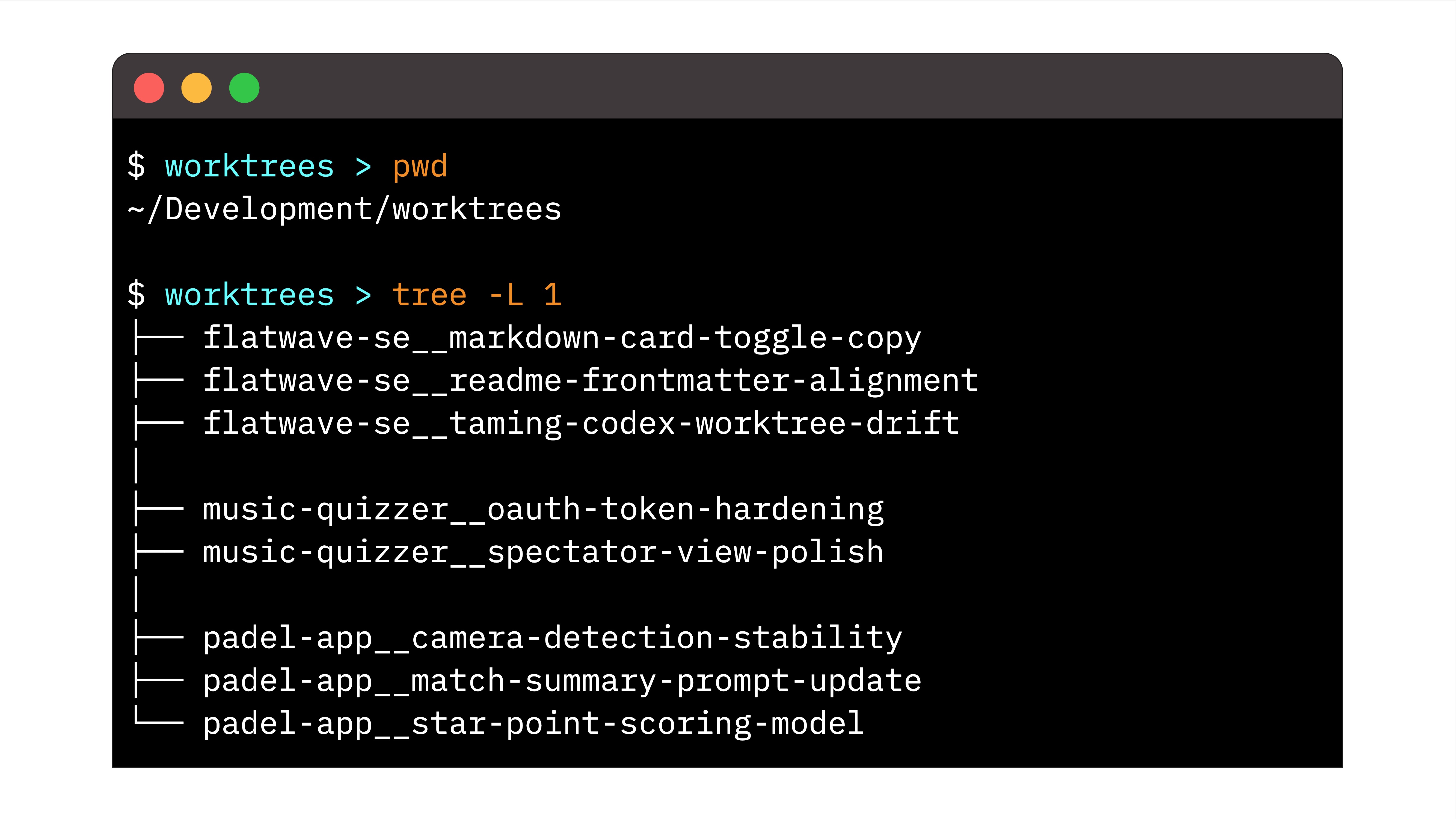
A real sample from ~/Development/worktrees: grouped, readable naming makes parallel branches across projects easy to scan and manage.
The skill we run globally
Once the directory pattern felt right, the next step was to make it automatic. I moved the rule into a global Codex skill so path and naming behavior stayed consistent across projects and sessions.
If you want to adopt the same setup, copy and paste the full snippet below into your own Codex skills setup and adjust paths to your environment.
Global Codex Skill (Copy/Paste)
Git Worktree Defaults
Policy
- Create every new worktree under ~/Development/worktrees by default.
- Use a different parent directory only when the user gives an explicit reason.
- Name every worktree directory as repo-name__short-branch-description.
- Keep short-branch-description concise, lowercase, and hyphenated.
- Derive repo-name from the repository root folder name.
Procedure
- Determine repository name from the git root directory basename.
- Convert the requested branch purpose into a short hyphenated descriptor (for example, fix-socket-timeout).
- Build worktree path as: ~/Development/worktrees/repo-name__short-branch-description
- Create the worktree at that exact path unless the user explicitly chooses another location.
Command Templates
- New branch and new worktree:
git worktree add ~/Development/worktrees/repo-name__short-branch-description -b codex/short-branch-description
- Existing branch and new worktree:
git worktree add ~/Development/worktrees/repo-name__short-branch-description existing-branch
Guardrails
- Keep directory naming consistent even when branch names differ.
- Ask for clarification only when no short branch description can be inferred.
Note: this example assumes your worktrees live under ~/Development/worktrees. If you use a different base folder, adjust those paths consistently in both the skill and Codex trust config.
The skill defines where worktrees should go. The remaining requirement is making sure Codex can operate fully in that location.
Worktree location and trust must align
Path conventions alone did not solve the issue. Trust scope in Codex config was part of the fix.
In ~/.codex/config.toml, I explicitly run this setup:
[projects."~/Development/worktrees"]
trust_level = "trusted"

[projects."~"]
trust_level = "untrusted"
This is enough for most setups: trust the dedicated worktree root, keep broader paths untrusted.
Closing the loop on worktree drift
The original problem was not that parallel worktrees failed. The problem was that faster agent automation came with path drift and loss of control.
After standardizing path + naming + trust boundaries, the workflow became predictable again. I can run multiple agents on parallel features in the same repository, keep cleanup low-risk, and move between sessions without re-discovering where worktrees landed.
Most importantly, failures caused by "wrong place, wrong access level" stopped recurring.
Keep defaults strict, exceptions explicit
This is a default, not a law. There are valid cases for custom paths.
But when no strong reason exists, one predictable location and naming pattern is the cheapest way I have found to preserve the upside of parallel agent work while preventing drift.
Parallel worktrees are not a niche trick in agent workflows anymore. They are becoming the practical baseline. The adaptation is straightforward: keep the parallelism, but put clear guardrails around where that parallelism runs across projects.
Good luck setting up your own guardrails, and may the force of parallel worktrees be with you.